Everything Overdeck does
Overdeck runs and directs AI coding agents across harnesses, models and machines. Here is every part of it, each with a link to the docs that cover it. Questions? Ask in the Overdeck Discord.
Conversations and code
Talk to agents and see what they changed, beside the chat.
-
Conversations
Talk to an agent in a rendered view, or switch to the raw terminal of the same session. Hand off to a new conversation to change the model.
Docs: Conversations -
The turn card
Each turn that edits files ends with a card listing the files, the lines added and removed, and whether the commit is pushed.
Docs: The turn card -
Code beside the chat
Open a file beside the conversation, with a blue bar on each line that conversation changed.
Docs: File explorer -
The full diff window
All turns shows only this conversation's edits. You can also compare the branch with main, or any two points.
Docs: Full diff window -
Edit, then a pull request
Your edits go to an edit workspace on its own branch and reach main only when a pull request merges.
Docs: Editing and Create PR -
File viewers
Images, PDFs, CSV, SQLite, notebooks and Mermaid diagrams open in the dashboard. Notebooks never run code.
Docs: File viewers -
Open in Overdeck
Docs: Open in Overdeckpan openopens a file or folder from your terminal in its project. An optional file manager entry adds Open in Overdeck to the right-click menu. -
Keyboard shortcuts
Press ? anywhere outside a text field to see every shortcut for the page you are on.
Docs: Keyboard shortcuts -
New conversation with options
Pick the project, machine, model, harness, effort, skills and a linked issue before the first message.
Docs: New conversation with options -
Handoff and fork
Carry a conversation's context into a new one with
Docs: Handing offpan handoff, or start fresh. This is also how you switch models. -
Steer a running turn
Interrupt a Claude Code agent or a Pi conversation mid-turn, queue a message, or hold it until your usage limit resets.
Docs: Sending to a busy agent -
Scheduled conversations
Send a stored prompt to a conversation on a schedule with
Docs: Scheduled runspan conv schedule. -
Subagents beside the chat
Claude Code and Codex subagents are listed beside their parent with their transcripts. Codex app-server subagents also get their own composer.
Docs: Subagent activity -
Bookmarks, citations and attachments
Bookmark messages, quote part of a reply into your next prompt, and attach files and images.
Docs: Bookmarks and citations -
Answer prompts from the dashboard
Permission prompts, questions and plans to approve open as dialogs and wait in Needs you, including those from subagents.
Docs: Needs you -
Settle and snooze
Split conversations into Needs you, Inbox, Snoozed and Settled, and settle them automatically after idle days or when the pull request merges.
Docs: Settling and snoozing -
Composer commands
Docs: Composer commands/pan <verb>runs Overdeck commands from the composer on every harness, and/lists your skills on Claude Code. -
Native terminal UIs
Attach Codex or OpenCode's own terminal UI to a running conversation from its Terminal tab.
Docs: Native Codex CLI in Terminal -
Command palette and search
Ctrl+K searches issues, conversations and commands. Semantic search over conversations needs an OpenAI key.
Docs: Keyboard shortcuts -
Markdown preview
Markdown files get a rendered preview in code and diff tabs, with front matter shown as a list and working relative links.
Docs: File explorer -
Simple and Advanced mode
New profiles open in Simple mode, and Home shows a Get set up checklist of what still needs attention.
Docs: Quickstart -
Voice input and read-aloud Opt-in
Dictate into the composer, and have the dashboard speak agent activity through a local text-to-speech voice.
Docs: Conversations

Issues and the pipeline
Hand over an issue and let agents carry it to a pull request you merge.
-
The issue pipeline
Docs: pan start and agent commandspan startplans the issue if needed, makes a workspace and starts a work agent. Agents build, review and test the work, and you click Merge. -
Planning
A plan agent reads the issue and writes a PRD and a checklist plan the work agent follows. Run it with
Docs: Agent commandspan plan, or letpan startdo it. -
Issue trackers
Issues come from GitHub, Linear, GitLab, Rally or Jira.
Docs: Issue trackers -
GitHub identities
Overdeck acts as the GitHub App bot where the App is installed and as your own
Docs: GitHub organizations and identitiesghaccount everywhere else. -
Workspaces
Each issue gets its own git worktree and feature branch, so several agents work at once without conflicts.
Docs: Workspaces -
Specialist agents
Review and test agents (the test agent also runs Playwright UAT) take a finished build to an approved, green pull request. You click Merge.
Docs: Convoys -
Verification gate
Typecheck, lint, the tests you touched and a plan check run before review, queued so the machine does not overload.
Docs: Quality gates in the project registry -
Conflict repair
An approved pull request that turns conflicting gets one repair instruction, and a stalled reviewer is started again.
Docs: Convoys -
One merge gate
Every merge path asks the same questions: approval at the head commit, green CI, mergeable, and the UAT verdict.
Docs: UAT batch trains -
Close-out
Docs: Workspacespan closechecks the definition of done and cleans up the workspace and branch. -
Pipeline journal and pan show
Each issue keeps an append-only journal.
Docs: Convoyspan show <id>prints its state, journal and health. -
Issue view, board and pipeline pages
A conversation-first issue view with Discussion, PRD, Changes and Checks tabs, plus a kanban board and a pipeline page by phase.
Docs: Mission Control -
Decisions from agents
Agents ask you a question with two to four options through
Docs: Push notificationspan ask. It lands in Needs you and on your phone. -
CI and review findings go back to the agent
Failing CI checks, with a log excerpt, and CodeRabbit findings go to the work agent to fix.
Docs: Auto-merge and CI -
Review convoy
In full review mode, four reviewers run in parallel and one writes the summary.
Docs: Convoys -
Merge trains Opt-in
Keep one assembled, testable batch of every ready feature, so you can try the result and land exactly what you tested. Turn on the Merge train switch on the Flywheel page.
Docs: UAT batch trains -
Strikes
Small fix pull requests from
Docs: UAT batch trainspan strikeget one quick review. With auto-merge on, they merge ahead of the train. -
Auto-merge Opt-in
Scheduled merging for approved, green pull requests, with a banner that lets you cancel first.
Docs: Auto-merge -
Swarm
Run one work agent per plan item, in parallel, on the same issue, each in its own worktree.
Docs: Swarm -
Gauntlet lanes
Launch builder, critic and verifier lanes from any harness with
Docs: Lanespan lane, and collect their reports. -
Projects and polyrepos
Add, clone or create projects. One project can span several repositories, with a git worktree in each per workspace.
Docs: Project registry -
Docker workspaces and local HTTPS
Give each workspace its own Docker Compose stack, served over HTTPS at a
Docs: Docker and HTTPS setup*.localhostaddress. -
Order books Early
A queue of issues with lanes, order and completion rules that Overdeck enforces.
Docs: Order books -
The Flywheel Early
Works across issues: picks what to do next, starts the agents and watches each pull request. Today it is the loop Overdeck uses to build itself.
Docs: The Flywheel vision -
Backlog sequencer and parked issues
Order the backlog the Flywheel works from, and see which issues it parked, why, and what releases them.
Docs: Order books

Harnesses and models
Use the coding agents and models you already have.
-
Harnesses
Claude Code (the default), Codex, Pi, Kimi Code natively or over ACP, OpenCode, Grok Build, Muse Code and Prime Agent.
Docs: Harnesses -
Model routing and presets
Set a model for plan, work, review, test and the other roles through three workhorse slots, or apply a preset: Anthropic defaults, an Anthropic cost-saver pilot, or OpenAI defaults, which are not yet eval-tested.
Docs: Model presets -
Tiered execution Opt-in
Plan difficulty picks a crew model for each issue, and a frontier model supervises the cheaper tiers.
Docs: Model presets -
Permission modes
New installs run Claude Code with an auto-approve hook instead of skipping every permission check.
Docs: Conversations -
Harness updates and version checks
npm-installed harness CLIs update automatically, and Overdeck refuses a launch on a CLI too old for the model.
Docs: Harnesses -
Effort
Choose the reasoning effort for each conversation and each role.
Docs: Effort -
Local models Experimental
Run Claude Code agents on a model served by a local Ollama, with no provider API key.
Docs: Local models -
Workers
Docs: Workerspan worker runhands one brief to a separate, issue-linked agent and prints its report. -
MCP server for agents
Claude Code, Codex, OpenCode and Kimi Code (over ACP) agents start with Overdeck's MCP server. Other harnesses get the matching
Docs: MCP serverpancommands. A project can add its own MCP servers.

Machines, devices and access
Run agents on any machine you link and reach them from anywhere.
-
Overdeck Anywhere
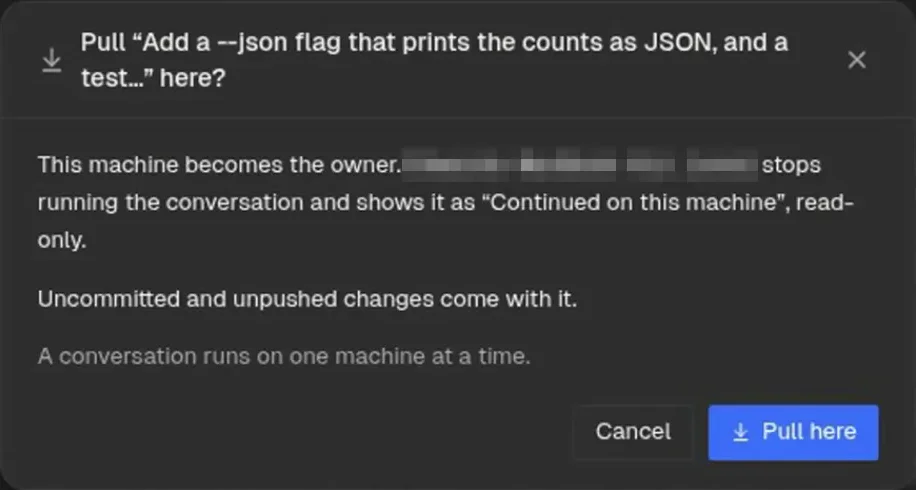
Link your machines. Each lists the other's conversations next to its own, and Pull here moves a running Claude Code or Codex conversation to the machine you are on.
Docs: Linked machines -
SSH machines Testing
Start or adopt Overdeck on a machine you reach over SSH, or install a lasting service with
Docs: pan machinesnpx @overdeck/core connect. -
Fly.io machines
Docs: Linked machinespan machines add-flystarts a Fly.io VM that runs Overdeck and links it. You pay Fly directly. -
Fleet updates
Docs: Linked machinespan machines versionsshows what each linked machine runs, and Update all waits for running turns. -
Remote access
Pair a laptop, tablet or second desktop with a machine's dashboard. Each device gets its own revocable session.
Docs: Remote access -
Scoped API tokens
Docs: pan tokenpan token createmakes a bearer token with only the scopes a program needs. -
Tailscale Testing
Turn on protected HTTPS access to the dashboard and find other Overdeck machines on your tailnet.
Docs: Tailscale -
Session Vault
Saves your agents' conversations, encrypted, to a git remote you own, so another machine can continue them.
Docs: Session Vault -
Shared sessions Early
Share a live Claude Code conversation by link. Viewers join from their own Overdeck, with npx, or in a browser, and you decide who gets in. Sharing needs an overdeck.ai account, and accounts are invite-only for now.
Docs: Shared sessions -
overdeck.ai account Early
Docs: pan accountpan account loginsigns in with GitHub for the hosted directory and shared sessions. Accounts are invite-only for now. -
Phone web app
The dashboard installs on a phone as a web app at
Docs: Browser on the phone/m: Needs you, conversations and the pipeline, with three-tap answers. -
iPhone and Android apps Testing
Native apps that pair by QR code over the encrypted channel, with sealed push and an iPhone Live Activity. In TestFlight and Play internal testing.
Docs: Phone -
Push notifications
Get a phone notification when an agent or conversation needs you, sent by your own machine.
Docs: Push notifications -
Desktop app
A desktop app for Linux, macOS and Windows from GitHub Releases. It can also open another machine's dashboard.
Docs: Downloads in the quickstart
Seeing and steering the work
Know what every agent is doing and what needs you.
-
Mission Control
The top bar counts the agents working and what needs you. All projects lists every project's conversations and opens up to four side by side.
Docs: Mission Control -
Project home
Actions, five facts, what needs you, the pipeline, and recent commits on main with the conversation or agent behind each one.
Docs: Project home -
Needs you
Questions, plans to approve, permission prompts and decisions wait in one list, each with one action to answer or open it.
Docs: Mission Control -
Costs at API rates
Each conversation row shows its changes and its cost. Costs are shown at API rates; plan costs may differ.
Docs: Mission Control -
Activity feed
A feed of what agents and conversations did, across projects.
Docs: Activity feed -
Appearance and themes
Light and dark color themes, two dashboard styles, and VS Code theme import.
Docs: Appearance -
Agents page Experimental
What is live, what needs you and what is waiting in the pipeline, with finished work in History. Turn it on in Settings, Experimental.
Docs: Agents page -
More experimental views Experimental
Costs, Metrics, Health, Resources and Sessions pages, shown when Settings, Experimental features is on.
Docs: Mission Control -
Context preview
See the layered launch context an agent will get, at
Docs: Context layers/context. -
God View Experimental
An ambient map of the live pipeline: where issues are moving, which hooks are firing and where work has gone stale. Turn it on in Settings, Experimental.
Docs: God View -
Hygiene check
Docs: Hygiene checkpan hygieneaudits commits, pushes, pull requests, agents, branches, workspaces and disk in one report. -
Safe shutdown
Docs: Safe shutdownpan shutdownlets every agent finish its current tool call, then stops everything and tells you it is safe to reboot. -
Emergency stop
Stop every agent from the agents menu or with one keyboard shortcut.
Docs: Keyboard shortcuts -
Low-disk alerts
Below 5 GiB and again below 2 GiB of free disk, Overdeck adds a Needs you item and sends a phone push.
Docs: Push notifications -
Recovery after restarts
After a terminal-backend restart you can resume every conversation, and dead work agents resume on their own.
Docs: After a terminal-backend restart -
Resource governor
Memory thresholds that scale with RAM, and CPU pressure checks, refuse new lanes and warn before agent starts. Conversations are never blocked.
Docs: Memory governor -
Terminal backend
Every agent runs in a Herdr pane by default. tmux is still supported when you ask for it.
Docs: Terminal backend

Skills, memory and knowledge
Skills, memory and rules for the agents Overdeck launches.
-
Skills
Docs: Skillspan syncinstalls Overdeck's skills for Claude Code, Codex and Pi. -
Skills on or off at every level
Turn each skill on or off globally, per project, per issue or per conversation.
Docs: Skills -
Skill packs
Try a third-party skill collection, such as Atlassian Rovo for Jira and Confluence, for one project, one issue or one conversation, pinned to a commit you approve. For Claude Code and Codex.
Docs: Skill packs -
Project memory
Short facts committed in your repository, so every managed harness sees the same list on every machine.
Docs: Project memory -
Memory search
Overdeck extracts observations from each workspace, and
Docs: Project memorypan memory searchfinds past decisions and fixes. -
Context layers
Rules for every machine, one project or one machine, delivered only to sessions Overdeck launches.
Docs: Context layers -
Project knowledge
Connect an Open Knowledge Format bundle. Agents get cited concepts in context, a local viewer shows the bundle, and
Docs: Project knowledge/okf publishbuilds a static site.
Integrations and automation
Connect Overdeck to the rest of your tools.
-
Webhook triggers
Let GitHub, Stripe, CI or a chat bot message a conversation or start one, through a secret URL on your machine.
Docs: Webhook triggers -
Connect a bot
Give a chat bot or a hosted assistant scoped, revocable access to Overdeck through its MCP server.
Docs: Connect a bot -
Semgrep Opt-in
Off by default. When on, the verification gate scans each branch and findings go to the security review. Optional switches add an MCP server and a scan after each Claude Code edit.
Docs: Semgrep -
Computer use Opt-in, Linux
Agents can read and operate a local desktop app: the accessibility tree, clicks, typing and screenshots.
Docs: Computer use -
Commit-status CI
CI that reports commit statuses, such as Dagger Cloud, counts as the test job.
Docs: Auto-merge and CI -
Linear sign-in for agents
One click connects Linear's MCP server for your agents.
Docs: Issue trackers -
Deft Directive
Docs: Skill packspan skills deft use <issue>runs one issue on Deft's own pipeline. -
Agent guardrails
Agents cannot set operator-only labels, commit on the wrong branch or edit the primary checkout.
Docs: Workspaces -
Jev judgment client Opt-in
Typed judgment calls to TypeSafe's Jev model. Off by default.
Docs: Jev
Setup and help
Install, check and fix Overdeck.
-
Quickstart
Docs: Quickstartnpx @overdeck/corestarts Overdeck and opens the dashboard. Needs Node.js 22 or newer, git, and Claude Code signed in. -
pan doctor and pan diagnose
Docs: Core commandspan doctorchecks your system and dependencies.pan diagnosecollects a redacted bundle and starts an agent on the problem. -
The pan CLI
Start agents, message them and move conversations from your shell.
Docs: CLI reference -
Telemetry
What anonymous telemetry Overdeck sends and how to turn it off.
Docs: Anonymous telemetry
Try it on your own code.
Free and open source. One command starts it. Read the quickstart.